If you’ve ever wondered:
- “What actually happens when I call
setState?” - “How does React decide what to re-render and what to skip?”
- “What’s this ‘Fiber’ thing people talk about?”
…this post is meant to be the final piece in your mental model of React rendering.
We’ll go under the hood and walk through:
- A high-level mental model of React’s rendering pipeline
- A historical note on how React rendered before Fiber
- The Fiber architecture: how React represents work internally
- The rendering phases: render (reconciliation) vs commit
- The flow from
setStateto DOM update - How the reconciliation algorithm works for elements and lists
- How React decides when to bail out or re-render
- How effects (
useEffect,useLayoutEffect) tie into commits - A concrete step-by-step render example
- Lanes: how React decides the priority of updates
- How concurrent rendering builds on top of fibers and lanes
- A full recap to tie everything together
1. Mental Model: React as a “Scheduler + Renderer”
At a very high level, modern React (16+) is two things wrapped together:
- A scheduler – decides when to work on updates, and which updates are more urgent.
- A renderer – figures out what the UI should look like, then applies changes to the host (the DOM, React Native, etc.).
When you write React, you mostly describe what the UI should be:
function Counter({ initial }) {
  const [count, setCount] = useState(initial);
  return (
    <button onClick={() => setCount(c => c + 1)}>
      Count: {count}
    </button>
  );
}
React’s job is to:
- Track when
countchanges. - Re-run
Counterto get a new “virtual tree”. - Compare the new tree to the previous one.
- Apply the minimal changes to the DOM.
Steps 2–4 are the rendering and reconciliation pipeline, powered by fibers and lanes.
2. Historical Note: How React Rendered Before Fiber
Before React 16, React used what is often called the stack reconciler.
At a high level, rendering worked like this:
- React would start at the root component.
- It would recursively call
render()/ function components down the tree. - For every update, React would walk the entire affected subtree synchronously.
- Once started, this work could not be interrupted until it finished.
You can imagine it as a normal JavaScript call stack:
render(App)
  -> render(Header)
  -> render(Main)
      -> render(Counter)
      -> render(Footer)
This model was simple, but it had two big limitations:
-
No interruption or pausing
If a large tree took 40ms to reconcile, the browser’s main thread was blocked for the full 40ms.
That meant dropped frames and janky interactions on slower devices. -
No granular priorities
A low-importance update (like preloading some data) had the same “all or nothing” behavior as a high-importance update (like a key press).
React couldn’t easily say, “Pause this big render, the user just typed in an input — handle that first.”
As UIs grew more complex and users expected smooth 60fps interactions, this model became too limiting.
Fiber was introduced in React 16 as a new internal architecture to solve exactly these problems:
- Represent work as a linked Fiber tree instead of just a JS call stack.
- Allow React to pause, resume, and even restart rendering work.
- Make priority-aware scheduling possible.
React 16 did not use the lane model described later in this article. Earlier Fiber releases represented priority with expiration times; lanes replaced that approach in later versions of the reconciler.
From this point on, when we talk about “rendering”, “reconciliation”, and “lanes”, we’re talking about how this Fiber-based engine works inside modern React.
3. The Fiber Architecture: React’s Internal Data Structure
JSX is transformed into React element values that describe component types, props, keys, and children. During reconciliation, React creates or reuses Fiber nodes from those element descriptions.
3.1 What Is a Fiber?
A Fiber is a JavaScript object that represents a unit of work in React’s tree.
Think of each Fiber node as:
“A component or DOM node + its state + pointers to children/sibling/parent + bookkeeping info.”
Simplified view of a Fiber:
type Fiber = {
  type: any;               // Component type or DOM tag: 'div', Button, etc.
  key: null | string;
  pendingProps: any;       // Props for the next render
  memoizedProps: any;      // Props from the last committed render
  memoizedState: any;      // State from hooks / class component
  child: Fiber | null;     // First child
  sibling: Fiber | null;   // Next sibling
  return: Fiber | null;    // Parent
  stateNode: any;          // e.g. actual DOM node or class instance
  flags: number;           // What needs to happen in commit (Placement, Update, etc.)
  alternate: Fiber | null; // Link to the “other” tree (current vs workInProgress)
  // ...plus many more internal fields (lanes, update queues, etc.)
};
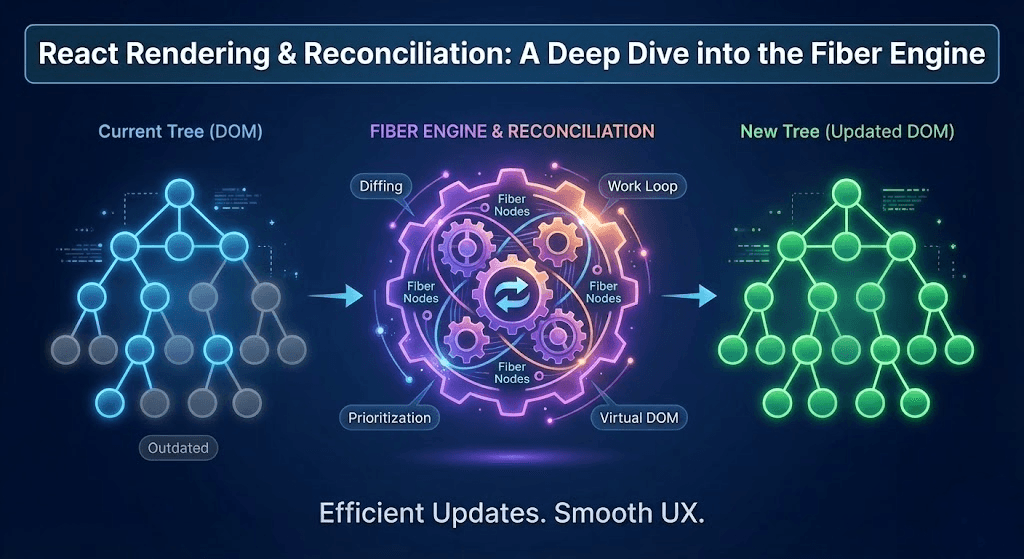
3.2 Two Trees: Current vs Work-In-Progress
For a mounted root, React commonly works with two versions of the Fiber tree:
- The current tree – what’s currently rendered on screen.
- The work-in-progress tree – what React is building for the next render.
Corresponding Fibers are linked through the alternate field. Alternates are created and reused as needed, so “two trees” is a useful mental model rather than a guarantee that every Fiber always has a populated twin.
We can visualize it like this:
Current Tree            Work-In-Progress Tree
------------            ----------------------
RootFiber (current) <-> RootFiber (WIP)
       |                         |
     Child                    Child (WIP)
       |                         |
    ...
When React successfully commits the finished work, the roles effectively swap:
- The work-in-progress tree becomes the new current tree.
- The old current tree becomes the new work-in-progress for future updates.
This double-buffering lets React prepare work without changing the tree currently visible to the user.
4. The Two Phases: Render vs Commit
React’s rendering pipeline is conceptually split into two phases.
4.1 Render Phase (Reconciliation)
- Can be interrupted, paused, or restarted (in concurrent mode).
- Purely computes what the next UI should look like.
- Builds or updates the work-in-progress Fiber tree.
- No changes are committed to the visible DOM here. On an initial mount, a host renderer may create detached instances while completing the work.
4.2 Commit Phase
- Applies visible changes synchronously and should remain fast.
- Performs commit work such as:
- DOM mutations (insert, update, delete nodes)
- Runs layout effects (
useLayoutEffect,componentDidMount, etc.) - Attaches refs
- Schedules passive effects (
useEffect) to be flushed separately.
Once the commit phase finishes, the work-in-progress tree becomes the new current tree.
A simple diagram:
5. From setState to Render: The Flow
Let’s zoom into what happens when setState (or a state hook) is called.
5.1 A Simple Example
function Counter() {
  const [count, setCount] = useState(0);

  console.log("render", count);

  return (
    <button onClick={() => setCount(c => c + 1)}>
      Count: {count}
    </button>
  );
}
When you click the button:
setCountpushes an update into the Fiber’s update queue.- React assigns a lane (priority) to this update and schedules work on the root Fiber.
- The scheduler eventually calls the renderer to perform work:
- It starts from the root Fiber and begins the render phase.
- It walks the tree and re-runs
Counter(and other affected components).
- During this walk, React creates or updates the work-in-progress fibers.
- After the work-in-progress tree is complete, React runs the commit phase to apply changes.
5.2 Render Phase: Depth-First Walk
The render phase is basically a depth-first traversal of the work-in-progress tree:
React performs a depth-first walk over the Fibers that contain relevant work. It can skip subtrees that have no matching work. For each Fiber it processes, React may call your component function or render() method and then:
- Compares the returned elements to the existing children
- Decides which children to keep, move, insert, or delete
- Sets the appropriate flags on Fibers and their parents (
Placement,Update,ChildDeletion)
Those flags drive what happens in the commit phase.
6. Reconciliation: How React Diffs Trees
Reconciliation is how React figures out what changed between the previous render and the next.
Key idea:
React uses a set of heuristics to make tree diffing efficient in O(n) time, assuming most of the tree structure stays similar between renders.
We’ll look at:
- Comparing a single child
- Comparing a list of children (where keys matter)
6.1 Single Child Reconciliation
Consider:
function App({ isLoggedIn }) {
  return (
    <div>
      {isLoggedIn ? <Dashboard /> : <Login />}
    </div>
  );
}
In the DOM tree for <div>, there is only one child (either Dashboard or Login).
React’s rules for a single child:
- If the element type is the same and key matches:
- e.g., old:
<Dashboard />, new:<Dashboard />
→ preserve the component's identity and state by reusing its Fiber. Host elements such as<div>can also reuse their DOM node.
- e.g., old:
- If the element type is different (or keys differ):
- e.g., old:
<Dashboard />, new:<Login />
→ delete the old subtree and mount a new one.
- e.g., old:
In this example, toggling isLoggedIn from true to false means:
- React sees
<Dashboard />replaced with<Login />. - It records Dashboard's Fiber in the parent Fiber's
deletionslist and marks the parent with ChildDeletion. - It creates a new Fiber for Login with a Placement flag.
- Commit phase: removes Dashboard’s DOM, adds Login’s DOM.
Those flag names match the React 19.2 child reconciler (opens in a new tab). The observable rule to remember is simpler: changing a component's type or key resets its identity and state.
6.2 List Reconciliation and Keys
Lists are where reconciliation gets tricky—and where keys become critical.
Example:
function TodoList({ todos }) {
  return (
    <ul>
      {todos.map(todo => (
        <li key={todo.id}>
          {todo.text}
        </li>
      ))}
    </ul>
  );
}
Let’s say the previous render had:
oldChildren = [
  <li key="1">Buy milk</li>,
  <li key="2">Walk dog</li>,
  <li key="3">Read book</li>,
];
New render:
newChildren = [
  <li key="2">Walk dog</li>,
  <li key="3">Read book</li>,
  <li key="4">Write blog</li>,
];
React’s heuristic (roughly):
- First pass: match children by index and key until a mismatch is found.
- When mismatch detected, React builds a map of remaining old children by key.
- For each new child:
- If key exists in map → move / reuse that Fiber, update props.
- If not → create a new Fiber (Placement).
- Any old children left in the map after processing new ones → Deletions.
Visually:
Old:  [1, 2, 3]
New:  [2, 3, 4]

Match '1' vs '2' -> mismatch -> build map {1,2,3}
Process '2' -> reuse old '2' (Update)
Process '3' -> reuse old '3' (Update)
Process '4' -> new node (Placement)
Leftover in map -> remove '1'
Because we used stable key={todo.id}, React can reuse the existing Fibers and DOM nodes for 2 and 3 instead of remounting them. In this specific example, deleting 1 naturally shifts the remaining DOM nodes; React only marks a reused child for movement when its relative order requires it.
What If We Used Index as Key?
If you wrote:
<li key={index}>Then deleting the first item changes indexes, so React thinks:
- Index 0: old
[Buy milk]vs new[Walk dog]→ Update, not delete/reuse
React reuses those positions exactly as the keys instruct it to. The problem is that component identity no longer follows the underlying todo, so focus, local state, or animations can become associated with the wrong item.
Moral: stable, meaning-based keys (like IDs) let React reconcile lists correctly and efficiently.
7. Bailing Out: When React Skips Rendering
React doesn’t blindly re-render the entire application for every update. It tracks where work is pending and has several ways to bail out early.
7.1 Memoized Props and State on Fibers
Each Fiber stores:
memoizedProps– props from the last commitmemoizedState– state from the last commit (hooks / class state)
During render, React compares:
pendingPropsvsmemoizedProps- Update queues and the lanes currently being processed
If nothing relevant changed and the subtree has no pending work for the lanes being rendered, React can skip it:
const HeavyComponent = React.memo(function HeavyComponent({ data }) {
  console.log("HeavyComponent render");
  // ...
});
If every prop is equal to its previous value, React can usually skip re-rendering HeavyComponent. Its own state or a context it reads can still trigger a render.
Under the hood:
- By default,
React.memocompares each prop with its previous value usingObject.is. - When the comparison passes and there is no relevant state or context update, React can reuse the existing work.
memo is a performance optimization, not a semantic guarantee. The React memo documentation (opens in a new tab) also notes that React Compiler can apply equivalent component memoization automatically when it is enabled.
7.2 shouldComponentUpdate / PureComponent
In class components:
shouldComponentUpdate(nextProps, nextState)lets you manually decide to skip.React.PureComponentdoes a shallow prop and state comparison by default.
These mechanisms plug into the same bailout logic in the reconciliation algorithm.
8. Render vs Commit: What Happens Where?
Let’s clarify which operations belong to which phase.
8.1 Render Phase
During render, React:
- Walks the Fiber tree (depth-first).
- Calls function components and class
render()methods. - Creates the work-in-progress tree.
- Calculates flags and subtree flags that guide the commit (
Placement,Update,ChildDeletion, etc.).
No changes are committed to the visible DOM, and no layout measurement or useEffect callbacks run here.
8.2 Commit Phase
During commit, React:
- Before mutation (rarely used lifecycle hooks).
- Mutation:
- Insert new DOM nodes
- Update DOM attributes and text
- Remove DOM nodes
- Layout:
- Run
useLayoutEffectcallbacks andcomponentDidMount/componentDidUpdate - Set refs
- Run
- Passive effects:
- Schedule
useEffectcallbacks to be flushed separately after the commit - Usually allow the browser to paint first, though interaction-driven updates can change that ordering
- Schedule
Timeline diagram:
The diagram shows the phases, not a guaranteed paint boundary. React generally lets the browser paint before passive effects that were not caused by an interaction. For interaction-driven updates, React may flush them earlier.
9. Effects and the Commit Phase
Hooks add another layer to understanding rendering.
9.1 useEffect
- Runs only after a render has committed; abandoned render work never runs Effects.
- Usually runs after paint when the update was not caused by an interaction.
- May run before paint for an interaction-driven update, so it is not a precise post-paint scheduling API.
- Runs only on the client, not during server rendering.
- Good for:
- Event subscriptions
- Logging
- Network calls
- Integrations that don’t need to block painting
useEffect(() => {
  const id = setInterval(() => {
    console.log("tick");
  }, 1000);
  return () => clearInterval(id);
}, []);
9.2 useLayoutEffect
- Runs synchronously after DOM mutations but before the browser paints.
- Can block painting if slow.
- Good for:
- Measuring DOM size/position
- Synchronous layout adjustments
- Imperative UI libraries that must run before paint
Internally, React treats layout effects and passive effects differently in the commit phase, so understanding which one you’re using is important for performance and avoiding flicker.
The official useEffect reference (opens in a new tab) documents the paint-order caveats. If an Effect must measure or update layout before the user sees the frame, use useLayoutEffect; otherwise prefer useEffect.
10. Step-by-Step Example: A Small Tree
Let’s walk through a tiny example to tie this together.
function Header() {
  console.log("Header render");
  return <h1>My App</h1>;
}

function Counter({ initial }) {
  const [count, setCount] = useState(initial);
  console.log("Counter render", count);
  return (
    <button onClick={() => setCount(c => c + 1)}>
      Count: {count}
    </button>
  );
}

function App() {
  return (
    <div>
      <Header />
      <Counter initial={0} />
    </div>
  );
}
10.1 Initial Mount
- React mounts
App:- Creates root Fiber (
Appas child ofHostRoot) - Render phase:
- Render
App→ returns<div>…</div> - Render
Header→ returns<h1> - Render
Counter→ returns<button>
- Render
- The reconciler creates the new Fiber tree and React DOM creates host instances while completing that work.
- Creates root Fiber (
- Commit phase:
- Attach the prepared DOM subtree to the visible container.
- Run layout effects (if any).
React does not mark every Fiber with Placement during an initial mount. The implementation can assemble a detached host subtree during the render work and use the commit to make it visible. The stable public model remains: React calculates the UI, then commits it to the DOM.
Console:
Header render
Counter render 0
10.2 On Click (Counter Update)
Clicking the button:
setCountenqueues an update on Counter’s Fiber.- Because the update came from a click, React schedules it as an urgent discrete update.
- Render phase (only parts of tree that need it):
- React marks the path from
Counterto the root as containing pending work. - It can follow that path and skip the unrelated
Headersibling;Headerdoes not need to be wrapped inmemofor this localized child update. Counterhas an update → re-runCounter:- Returns
<button>with newcounttext.
- Returns
- React compares old vs new
<button>:- Same type
'button'and key → markUpdate, notPlacement.
- Same type
- React marks the path from
- Commit phase:
- Update the button’s text node.
- Effects if any.
Console:
Header render
Counter render 0
Counter render 1
(Depending on StrictMode in dev, you might see double render logs.)
If App itself re-rendered, React would normally call the nested Header again unless memoization or React Compiler provided a bailout. That is different from an update originating inside the sibling Counter subtree.
11. Lanes: How React Decides Update Priority
So far, we’ve treated all updates as if they were equal. In reality, React knows that:
- A click or keypress is more important than
- A transition that prepares a large result list.
Internally, React represents priority using lanes.
11.1 What Are Lanes?
Lanes are bit positions used to label updates and track sets of pending work. An individual update is assigned a lane; a render can process one lane or a compatible group of lanes together.
Imagine a highway:
- Each lane identifies a class or stream of work.
- Related lanes form broader groups, such as transition or retry lanes.
- The root keeps a pendingLanes bitmask = union of all lanes with work.
- Other masks record suspended, pinged, expired, and entangled work.
Why this design?
- Multiple kinds of work can coexist on the same root.
- Lanes are easy to combine and compare with bitwise operations.
- React can batch compatible updates while preserving scheduling information.
In React 19.2 source, you’ll see names such as:
SyncLaneInputContinuousLaneDefaultLaneTransitionLanes, which contains multiple individual transition lanesRetryLanesIdleLaneOffscreenLane
These are private implementation details rather than APIs. The pinned React 19.2 lane source (opens in a new tab) is the authority for the names used in this section.
11.2 Where Do Lanes Come From?
React assigns a lane when an update is scheduled. The choice depends on factors such as whether the update is inside a transition, the priority of the triggering event, and whether React is already rendering.
Roughly:
- Urgent work → discrete user events:
onClick,onKeyDown,onChange, etc.
- Continuous input work → events such as
onScrollandonMouseMove. - Transition lanes → updates wrapped in
startTransitionoruseTransition. - Default work → updates without a more specific event or transition priority.
Example: a simple urgent update
function Button() {
  const [pressed, setPressed] = useState(false);

  return (
    <button onClick={() => setPressed(true)}>
      Click me
    </button>
  );
}- The
setPressed(true)is triggered inside a click event handler. - React treats this as a high-priority (sync-like) update.
- The UI should respond quickly to this interaction.
Example: mixing urgent and transition updates
import { startTransition, useMemo, useState } from "react";

function Search({ items }) {
  const [query, setQuery] = useState("");
  const [filterQuery, setFilterQuery] = useState("");

  function handleChange(e) {
    const value = e.target.value;

    // Urgent: keep the input responsive
    setQuery(value);

    // Non-urgent: mark the render driven by this state as a Transition
    startTransition(() => {
      setFilterQuery(value);
    });
  }

  // The urgent query render can reuse the previous calculation.
  // A transition render recomputes when filterQuery changes.
  const results = useMemo(
    () => expensiveFilter(items, filterQuery),
    [items, filterQuery]
  );

  return (
    <>
      <input value={query} onChange={handleChange} />
      <Results items={results} />
    </>
  );
}
Here:
setQuery(value)updates the controlled input urgently.setFilterQuery(value)is marked as a Transition.- The render that calculates and displays the filtered result can be interrupted and restarted when newer input arrives.
startTransition calls its callback immediately. It does not defer arbitrary JavaScript inside that callback. Writing setResults(expensiveFilter(value)) would still run expensiveFilter synchronously in the event handler before the state update is scheduled.
11.3 How React Picks a Lane for an Update
At a conceptual level, scheduling a state update looks like:
function scheduleStateUpdate(fiber, update) {
  const lane = requestUpdateLane(fiber);
  enqueueUpdate(fiber, update, lane);
  scheduleUpdateOnFiber(fiber, lane);
}
The real functions accept additional arguments and handle render-phase updates, transitions, entanglement, hidden trees, hydration, and development checks. The useful mental model is: label the update, propagate that pending work to the root, then make sure the root is scheduled.
11.4 How React Chooses What to Render Next
React does more than select the lowest set bit. Its lane-selection logic considers:
- The highest-priority non-idle work that is not blocked
- Suspended work that has been pinged because its data became available
- Work that has expired to prevent starvation
- Lanes that must render together because they are entangled
- Whether continuing the current work is preferable to restarting at a different priority
If higher-priority work appears while a transition render is in progress, React can abandon or pause the transition work, handle the urgent update, and later restart the transition using the latest state.
Practical implication:
- While a heavy transition (like filtering a large list) is running,
- If the user types or clicks, React can jump to the higher-priority lane, keeping the UI responsive.
11.5 Multiple Updates and Lane Merging
Because lanes are bitmasks, React can track several classes of pending work together:
Example:
root.pendingLanes = SyncLane | someTransitionLane;When React picks what to work on:
- It first picks
SyncLane(urgent work). - Once that’s done, if the transition is still pending and unblocked, React can process it next.
Some lanes are deliberately processed or entangled as a group, so a lane is not simply a queue that React always drains in isolation.
11.6 Lanes vs. Old Expiration Times
Older concurrent React prototypes used expiration times (timestamps) to represent priority.
Lanes replaced that model because:
- Bitmasks represent sets of work compactly.
- React can group, merge, remove, and compare work efficiently.
- A root can track pending, suspended, pinged, expired, and entangled sets independently.
11.7 Why Lanes Matter to You (Practically)
As a React developer, you don’t assign lanes manually, but understanding them explains:
-
Why some updates feel more responsive than others
- User input vs deferred transitions vs idle work.
-
Why
startTransitionsmooths your UI- It moves work to lower-priority lanes so urgent lanes can run first.
-
Why renders may be restarted in concurrent mode
- Lower-priority lanes can be paused or thrown away in favor of more urgent lanes.
-
Why render logs may appear without a commit
- React may call components again when transition work is interrupted or restarted. Effects do not run for abandoned renders; they run only after committed work.
Rule of thumb:
- Use normal state updates (
setState,useState) for user-driven changes that should feel instant. - Mark the state update that drives non-urgent rendering with
startTransitionoruseTransition. - Use
useDeferredValuewhen you receive a rapidly changing value but do not control the state update that produced it. - Do not expect a Transition to defer arbitrary synchronous JavaScript.
Lanes are the missing piece that connects fibers (data structure) with concurrent rendering (behavior).
12. Concurrent Rendering: Why Fibers (and Lanes) Matter
With React 18’s concurrent features, the Fiber architecture + lanes really shine.
Key points:
- The render phase can be interrupted:
- If a more urgent update appears (e.g., a keypress), React can pause low-priority work.
- React can prepare a new UI tree through cooperative work on the main JavaScript thread. “Background” rendering does not mean a Web Worker or a second thread.
- Only when ready does React go into the commit phase and update the DOM.
The search example in the previous section uses startTransition to mark the state update that drives result rendering. React invokes the startTransition callback immediately, but the resulting render is non-blocking and can be restarted when urgent input arrives. The official startTransition reference (opens in a new tab) documents this distinction.
Fibers + lanes + concurrent rendering = React can coordinate this efficiently.
13. Putting It All Together
Let’s recap React’s rendering and reconciliation pipeline with lanes included:
- You trigger an update (
setState, new props, context change…). - React assigns the update a lane based on its priority:
- Urgent input, default, transition, and other internal categories.
- React enqueues an update on the appropriate Fiber and marks that lane as pending on the root.
- In the render phase (reconciliation):
- React selects eligible lanes based on priority and scheduling state.
- It builds/updates the work-in-progress Fiber tree.
- It walks the tree depth-first, re-running components as needed.
- It compares new elements to previous ones and decides what to keep, move, add, or delete.
- It sets flags on Fibers and their parents (
Placement,Update,ChildDeletion, etc.). - In concurrent mode, this phase can be interrupted, paused, or restarted when higher-priority lanes appear.
- Once the work-in-progress tree for the chosen lanes is ready, React enters the commit phase:
- Applies DOM mutations based on the flags.
- Runs layout effects and sets refs.
- Schedules passive effects (
useEffect) to be flushed separately. - Swaps the roles: work-in-progress tree becomes the new current tree.
- The browser paints the updated UI. Passive effects usually run after paint for non-interaction updates, but their exact ordering relative to paint is not guaranteed in every case.
With that, you now have:
- A mental model of fibers, double trees, and reconciliation.
- An understanding of render vs commit and how effects fit in.
- Clarity on how lists and keys impact diffing.
- A picture of bailouts and how React skips unnecessary work.
- And finally, an internal model of lanes and priority, which is the core of concurrent rendering.
The practical takeaway is to keep rendering pure, use stable keys to preserve identity, measure before adding memoization, and mark only non-urgent state updates as Transitions. Fiber and lanes explain why those practices work, but application code should depend on React's public behavior rather than private field or lane names.
Vikram Dokkupalle
Frontend Engineer & UI/UX Enthusiast. Passionate about React, performance, and clean design.